

概要
roundcubemailの利便性を上げるためにカレンダーやタスクリストをインストールした記録です。
そのため以下のパッケージのインストールやバージョンアップを行う。
・kolab/calendarをインストールする。
・kolab/tasklistをインストールする。
・libkolabxmlパッケージのインストールに必要なパッケージをインストールする。
・libkolabxmlソースをビルドしてインストールする。
・phpをバージョンアップする。
kolab/calendarのインストール
READMEを確認してインストールする
以下のREADMEの内容に従ってインストールする。
1. Get the source from git

  $ cd /tmp
  $ git clone https://git.kolab.org/diffusion/RPK/roundcubemail-plugins-kolab.git
  $ cd /<path-to-roundcube>/plugins
  $ cp -r /tmp/roundcubemail-plugins-kolab/plugins/calendar .
  $ cp -r /tmp/roundcubemail-plugins-kolab/plugins/libcalendaring .
  $ cp -r /tmp/roundcubemail-plugins-kolab/plugins/libkolab .

2. Create calendar plugin configuration

  $ cd calendar/
  $ cp config.inc.php.dist config.inc.php
  $ edit config.inc.php

3. Initialize the calendar database tables

  $ cd ../../
  $ bin/initdb.sh --dir=plugins/calendar/drivers/database/SQL

4. Build css styles for the Elastic skin

  $ lessc --relative-urls -x plugins/libkolab/skins/elastic/libkolab.less > plugins/libkolab/skins/elastic/libkolab.min.css

5. Enable the calendar plugin

  $ edit config/config.inc.php

Add 'calendar' to the list of active plugins:

  $config['plugins'] = array(
    (...)
    'calendar',
  );
動作を確認する。
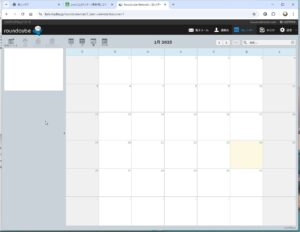
カレンダーの画面は表示されるが、ボタンがグレーアウトのため使用できない。
kolab/tasklistのインストール
READMEを確認すしてインストールする
以下のREADMEの内容に従ってインストールする。
1. Get the source from git

  $ cd /tmp
  $ git clone https://git.kolab.org/diffusion/RPK/roundcubemail-plugins-kolab.git
  $ cd /<path-to-roundcube>/plugins
  $ cp -r /tmp/roundcubemail-plugins-kolab/plugins/calendar .
  $ cp -r /tmp/roundcubemail-plugins-kolab/plugins/libcalendaring .
  $ cp -r /tmp/roundcubemail-plugins-kolab/plugins/libkolab .

2. Create calendar plugin configuration

  $ cd calendar/
  $ cp config.inc.php.dist config.inc.php
  $ edit config.inc.php

3. Initialize the calendar database tables

  $ cd ../../
  $ bin/initdb.sh --dir=plugins/calendar/drivers/database/SQL

4. Build css styles for the Elastic skin

  $ lessc --relative-urls -x plugins/libkolab/skins/elastic/libkolab.less > plugins/libkolab/skins/elastic/libkolab.min.css

5. Enable the calendar plugin

  $ edit config/config.inc.php

Add 'calendar' to the list of active plugins:

  $config['plugins'] = array(
    (...)
    'calendar',
  );
動作を確認する。
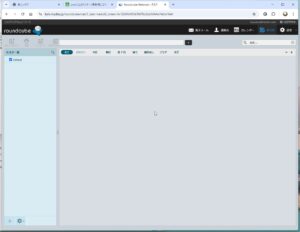
タスクの画面は表示されるが、ボタンがグレーアウトのため使用できない。
libkolabパッケージのREADME確認
READMEには、以下のライブラリやパッケージのインストールが必要との記載がある。
REQUIREMENTS
------------
* libkolabxml PHP bindings
  - kolabformat.so loaded into PHP
  - kolabformat.php placed somewhere in the include_path
* PEAR: HTTP/Request2
* PEAR: Net/URL2
libkolabxmlパッケージのインストールをこころみる
php-kolabformatパッケージをインストールしてみる
php-kolabformatパッケージにkolabformat.soライブラリが入っているので、php-kolabformatパッケージのインストールを実行するがエラーとなる。
php-8.0用(php-common-8.0.30-XX)のphp-kolabformat-1.2.0-12パッケージしか無いと言っているらしい。
# yum -y install php-kolabformat
メタデータの期限切れの最終確認: 0:10:39 前の 2025年01月23日 19時32分02秒 に実施しました。
エラー:
 問題: package php-kolabformat-1.2.0-12.el9.x86_64 from epel requires php(api) = 20200930-64, but none of the providers can be installed
  - package php-kolabformat-1.2.0-12.el9.x86_64 from epel requires php(zend-abi) = 20200930-64, but none of the providers can be installed
  - 競合するリクエスト
  - package php-common-8.0.30-10.el9.remi.x86_64 from remi-modular is filtered out by modular filtering
  - package php-common-8.0.30-11.el9.remi.x86_64 from remi-modular is filtered out by modular filtering
  - package php-common-8.0.30-1.el9_2.x86_64 from appstream is filtered out by modular filtering
(インストール不可のパッケージをスキップするには、'--skip-broken' を追加してみてください または、'--nobest' を追加して、最適候補のパッケージのみを使用しないでください)
#
phpをバージョンアップする
phpをphp-8.3にバージョンアップすれば対応するphp-kolabformatパッケージが存在して、インストールできるかもしれないと思い、phpを8.3にバージョンアップしてみた。
# dnf module list php
メタデータの期限切れの最終確認: 0:00:29 前の 2025年01月27日 20時58分14秒 に実施しました。
Remi's Modular repository for Enterprise Linux 9 - x86_64
Name             Stream               Profiles                               Summary
php              remi-7.4             common [d], devel, minimal             PHP scripting language
php              remi-8.0             common [d], devel, minimal             PHP scripting language
php              remi-8.1             common [d], devel, minimal             PHP scripting language
php              remi-8.2             common [d], devel, minimal             PHP scripting language
php              remi-8.3             common [d], devel, minimal             PHP scripting language
php              remi-8.4             common [d], devel, minimal             PHP scripting language

ヒント: [d]efault, [e]nabled, [x]disabled, [i]nstalled
#
#  dnf module -y switch-to php:remi-8.3
メタデータの期限切れの最終確認: 0:01:06 前の 2025年01月27日 20時58分14秒 に実施しました。
依存関係が解決しました。
==============================================================================================================
 パッケージ                     Arch            バージョン                        リポジトリー          サイズ
==============================================================================================================
アップグレード:
 php                            x86_64          8.3.16-1.el9.remi                 remi-modular          1.8 M
 php-cli                        x86_64          8.3.16-1.el9.remi                 remi-modular          5.6 M
 php-common                     x86_64          8.3.16-1.el9.remi                 remi-modular          1.3 M
 php-devel                      x86_64          8.3.16-1.el9.remi                 remi-modular          778 k
 php-enchant                    x86_64          8.3.16-1.el9.remi                 remi-modular           28 k
 php-fpm                        x86_64          8.3.16-1.el9.remi                 remi-modular          1.9 M
 php-gd                         x86_64          8.3.16-1.el9.remi                 remi-modular           64 k
 php-intl                       x86_64          8.3.16-1.el9.remi                 remi-modular          231 k
 php-ldap                       x86_64          8.3.16-1.el9.remi                 remi-modular           63 k
 php-mbstring                   x86_64          8.3.16-1.el9.remi                 remi-modular          580 k
 php-mysqlnd                    x86_64          8.3.16-1.el9.remi                 remi-modular          219 k
 php-opcache                    x86_64          8.3.16-1.el9.remi                 remi-modular          577 k
 php-pdo                        x86_64          8.3.16-1.el9.remi                 remi-modular          120 k
 php-pecl-apcu                  x86_64          5.1.24-1.el9.remi.8.3             remi-modular           77 k
 php-pecl-zip                   x86_64          1.22.4-1.el9.remi.8.3             remi-modular           77 k
 php-process                    x86_64          8.3.16-1.el9.remi                 remi-modular           69 k
 php-sodium                     x86_64          8.3.16-1.el9.remi                 remi-modular           61 k
 php-xml                        x86_64          8.3.16-1.el9.remi                 remi-modular          221 k
依存関係のインストール:
 capstone                       x86_64          4.0.2-0.10.el9.remi               remi-safe             765 k
弱い依存関係のインストール:
 php-nikic-php-parser5          noarch          5.4.0-1.el9                       epel                  174 k
モジュールストリームの有効化中:
 php                                            remi-8.3

トランザクションの概要
==============================================================================================================
インストール     2 パッケージ
アップグレード  18 パッケージ

ダウンロードサイズの合計: 15 M
パッケージのダウンロード:

アップグレード済み:
  php-8.3.16-1.el9.remi.x86_64                          php-cli-8.3.16-1.el9.remi.x86_64
  php-common-8.3.16-1.el9.remi.x86_64                   php-devel-8.3.16-1.el9.remi.x86_64
  php-enchant-8.3.16-1.el9.remi.x86_64                  php-fpm-8.3.16-1.el9.remi.x86_64
  php-gd-8.3.16-1.el9.remi.x86_64                       php-intl-8.3.16-1.el9.remi.x86_64
  php-ldap-8.3.16-1.el9.remi.x86_64                     php-mbstring-8.3.16-1.el9.remi.x86_64
  php-mysqlnd-8.3.16-1.el9.remi.x86_64                  php-opcache-8.3.16-1.el9.remi.x86_64
  php-pdo-8.3.16-1.el9.remi.x86_64                      php-pecl-apcu-5.1.24-1.el9.remi.8.3.x86_64
  php-pecl-zip-1.22.4-1.el9.remi.8.3.x86_64             php-process-8.3.16-1.el9.remi.x86_64
  php-sodium-8.3.16-1.el9.remi.x86_64                   php-xml-8.3.16-1.el9.remi.x86_64
インストール済み:
  capstone-4.0.2-0.10.el9.remi.x86_64                 php-nikic-php-parser5-5.4.0-1.el9.noarch

完了しました!
#
# php -v
PHP 8.3.16 (cli) (built: Jan 14 2025 18:25:29) (NTS gcc x86_64)
Copyright (c) The PHP Group
Zend Engine v4.3.16, Copyright (c) Zend Technologies
    with Zend OPcache v8.3.16, Copyright (c), by Zend Technologies
#
# dnf module list phpdnf module list php
メタデータの期限切れの最終確認: 0:04:21 前の 2025年01月27日 20時58分14秒 に実施しました。
Remi's Modular repository for Enterprise Linux 9 - x86_64
Name            Stream                  Profiles                              Summary
php             remi-7.4                common [d], devel, minimal            PHP scripting language
php             remi-8.0                common [d], devel, minimal            PHP scripting language
php             remi-8.1                common [d], devel, minimal            PHP scripting language
php             remi-8.2                common [d], devel, minimal            PHP scripting language
php             remi-8.3 [e]            common [d], devel, minimal            PHP scripting language
php             remi-8.4                common [d], devel, minimal            PHP scripting language

ヒント: [d]efault, [e]nabled, [x]disabled, [i]nstalled
#
# systemctl restart nginx
#
# systemctl restart php-fpm
#
phpを8.3にバージョンアップしたが、やはりphp-8.0のphp-kolabformatパッケージしか無いと言われた。
libkolabxmlパッケージのソースをダウンロードしてbuildする
すでに以下のパッケージのみインストールされています。
libkolabxml-1.2.0-12.el9.x86_64
インストールするパッケージが無いならパッケージを作ろうと思い、すでにインストールされているパッケージと同じバージョンのlibkolabxmlパッケージのソースバージョンをダウンロードする。
libkolabxmlソースをbuildすると以下のパッケージが作成される。
・java-kolabformat-1.2.0-12.el9.x86_64.rpm
・libkolabxml-1.2.0-12.el9.x86_64.rpm
・libkolabxml-debuginfo-1.2.0-12.el9.x86_64.rpm
・libkolabxml-debugsource-1.2.0-12.el9.x86_64.rpm
・libkolabxml-devel-1.2.0-12.el9.x86_64.rpm
・php-kolabformat-1.2.0-12.el9.x86_64.rpm
・php-kolabformat-debuginfo-1.2.0-12.el9.x86_64.rpm
・python3-kolabformat-1.2.0-12.el9.x86_64.rpm
・python3-kolabformat-debuginfo-1.2.0-12.el9.x86_64.rpm
ソースファイルをrpmbuildするが、libkolabxmlパッケージ作成に必要な他のパッケージが不足しているため、作成できない。
# rpmbuild --rebuild libkolabxml-1.2.0-12.el9.src.rpm
libkolabxml-1.2.0-12.el9.src.rpm をインストール中です。
警告: user mockbuild does not exist - using root
警告: group mock does not exist - using root
警告: user mockbuild does not exist - using root
警告: group mock does not exist - using root
警告: Macro expanded in comment on line 80: %{version}-%{release}

setting SOURCE_DATE_EPOCH=1658361600
エラー: ビルド依存性の失敗:
    e2fsprogs-devel は libkolabxml-1.2.0-12.el9.x86_64 に必要とされています
    libcurl-devel は libkolabxml-1.2.0-12.el9.x86_64 に必要とされています
    swig は libkolabxml-1.2.0-12.el9.x86_64 に必要とされています
    uuid-devel は libkolabxml-1.2.0-12.el9.x86_64 に必要とされています
    xerces-c-devel は libkolabxml-1.2.0-12.el9.x86_64 に必要とされています
    xsd は libkolabxml-1.2.0-12.el9.x86_64 に必要とされています
#
yumコマンドでインストールできるパッケージをインストールする
すべてのパッケージではないが、yumコマンドでインストールできる以下のパッケージをインストールする。
・swig
・xsd
・xerces-c-devel
# yum -y install swig
依存関係が解決しました。
==============================================================================================================
 パッケージ             アーキテクチャー         バージョン                       リポジトリー          サイズ
==============================================================================================================
インストール:
 swig                   x86_64                   4.0.2-8.el9                      crb                   1.5 M

トランザクションの概要
==============================================================================================================
インストール  1 パッケージ
インストール済み:
  swig-4.0.2-8.el9.x86_64

完了しました!
#
# yum -y install xsd
メタデータの期限切れの最終確認: 0:00:16 前の 2025年01月26日 14時43分58秒 に実施しました。
依存関係が解決しました。
==============================================================================================================
 パッケージ              アーキテクチャー       バージョン                         リポジトリー         サイズ
==============================================================================================================
インストール:
 xsd                     x86_64                 4.1.0-0.8.a11.el9                  epel                 1.2 M
依存関係のインストール:
 libcutl                 x86_64                 1.10.0-23.el9                      epel                 311 k

トランザクションの概要
==============================================================================================================
インストール  2 パッケージ
インストール済み:
  libcutl-1.10.0-23.el9.x86_64                          xsd-4.1.0-0.8.a11.el9.x86_64

完了しました!
#
# yum -y install xerces-c-devel
メタデータの期限切れの最終確認: 0:01:33 前の 2025年01月26日 14時43分58秒 に実施しました。
依存関係が解決しました。
==============================================================================================================
 パッケージ                     アーキテクチャー       バージョン                  リポジトリー         サイズ
==============================================================================================================
インストール:
 xerces-c-devel                 x86_64                 3.2.5-1.el9                 epel                 435 k

トランザクションの概要
==============================================================================================================
インストール  1 パッケージ
インストール済み:
  xerces-c-devel-3.2.5-1.el9.x86_64

完了しました!
#
パッケージをダウンロードしてインストールする
yumコマンドでインストできない以下のパッケージをhttps://rpmfind.netサイトからダウンロードしてインストールする。
・e2fsprogs-devel-1.46.5-5.el9.x86_64.rpm
・libcurl-devel-7.76.1-31.el9.x86_64.rpm
・uuid-1.6.2-55.el9.x86_64.rpm
・uuid-devel-1.6.2-55.el9.x86_64.rpm
# rpm -ivf e2fsprogs-devel-1.46.5-5.el9.x86_64.rpm
警告: e2fsprogs-devel-1.46.5-5.el9.x86_64.rpm: ヘッダー V4 RSA/SHA256 Signature、鍵 ID 8483c65d: NOKEY
Verifying packages...
パッケージの準備中...
e2fsprogs-devel-1.46.5-5.el9.x86_64
#
# rpm -ivf libcurl-devel-7.76.1-31.el9.x86_64.rpm
警告: libcurl-devel-7.76.1-31.el9.x86_64.rpm: ヘッダー V4 RSA/SHA256 Signature、鍵 ID 8483c65d: NOKEY
Verifying packages...
パッケージの準備中...
libcurl-devel-7.76.1-31.el9.x86_64
#
# rpm -ivf uuid-1.6.2-55.el9.x86_64.rpm
警告: uuid-1.6.2-55.el9.x86_64.rpm: ヘッダー V3 RSA/SHA256 Signature、鍵 ID 8483c65d: NOKEY
Verifying packages...
パッケージの準備中...
uuid-1.6.2-55.el9.x86_64
#
# rpm -vi ivf uuid-devel-1.6.2-55.el9.x86_64.rpm
警告: uuid-devel-1.6.2-55.el9.x86_64.rpm: ヘッダー V3 RSA/SHA256 Signature、鍵 ID 8483c65d: NOKEY
Verifying packages...
パッケージの準備中...
uuid-devel-1.6.2-55.el9.x86_64
#
libkolabxmlをbuildする
やっと、libkolabxmlのビルドができるので環境ができたので、ビルドする。
# rpmbuild --rebuild libkolabxml-1.2.0-12.el9.src.rpm
libkolabxml-1.2.0-12.el9.src.rpm をインストール中です。
警告: user mockbuild does not exist - using root
警告: group mock does not exist - using root
警告: user mockbuild does not exist - using root
警告: group mock does not exist - using root
警告: Macro expanded in comment on line 80: %{version}-%{release}

setting SOURCE_DATE_EPOCH=1658361600
実行中(%prep): /bin/sh -e /var/tmp/rpm-tmp.RwRI8b
+ umask 022
+ cd /root/rpmbuild/BUILD
+ cd /root/rpmbuild/BUILD
+ rm -rf libkolabxml-1.2.0
+ /usr/bin/gzip -dc /root/rpmbuild/SOURCES/libkolabxml-1.2.0.tar.gz
+ /usr/bin/tar -xof -
+ STATUS=0
   :
書き込み完了: /root/rpmbuild/RPMS/x86_64/java-kolabformat-1.2.0-12.el9.x86_64.rpm
書き込み完了: /root/rpmbuild/RPMS/x86_64/libkolabxml-devel-1.2.0-12.el9.x86_64.rpm
書き込み完了: /root/rpmbuild/RPMS/x86_64/php-kolabformat-1.2.0-12.el9.x86_64.rpm
書き込み完了: /root/rpmbuild/RPMS/x86_64/python3-kolabformat-1.2.0-12.el9.x86_64.rpm
書き込み完了: /root/rpmbuild/RPMS/x86_64/libkolabxml-1.2.0-12.el9.x86_64.rpm
書き込み完了: /root/rpmbuild/RPMS/x86_64/php-kolabformat-debuginfo-1.2.0-12.el9.x86_64.rpm
書き込み完了: /root/rpmbuild/RPMS/x86_64/libkolabxml-debugsource-1.2.0-12.el9.x86_64.rpm
書き込み完了: /root/rpmbuild/RPMS/x86_64/python3-kolabformat-debuginfo-1.2.0-12.el9.x86_64.rpm
書き込み完了: /root/rpmbuild/RPMS/x86_64/libkolabxml-debuginfo-1.2.0-12.el9.x86_64.rpm
実行中(%clean): /bin/sh -e /var/tmp/rpm-tmp.vH3BHe
+ umask 022
+ cd /root/rpmbuild/BUILD
+ cd libkolabxml-1.2.0
+ /usr/bin/rm -rf /root/rpmbuild/BUILDROOT/libkolabxml-1.2.0-12.el9.x86_64
+ RPM_EC=0
++ jobs -p
+ exit 0
実行中(--clean): /bin/sh -e /var/tmp/rpm-tmp.GTEGDZ
+ umask 022
+ cd /root/rpmbuild/BUILD
+ rm -rf libkolabxml-1.2.0
+ RPM_EC=0
++ jobs -p
+ exit 0
#
buildしたパッケージをインストールする
libkolabxml-1.2.0-12.el9.x86_64はすでにインストールされているためインストールできない(しなくてよい)。
# cd /root/rpmbuild/RPMS
#
# rpm -ivf java-kolabformat-1.2.0-12.el9.x86_64.rpm \
libkolabxml-1.2.0-12.el9.x86_64.rpm \
libkolabxml-debuginfo-1.2.0-12.el9.x86_64.rpm \
libkolabxml-debugsource-1.2.0-12.el9.x86_64.rpm \
libkolabxml-devel-1.2.0-12.el9.x86_64.rpm \
php-kolabformat-1.2.0-12.el9.x86_64.rpm \
php-kolabformat-debuginfo-1.2.0-12.el9.x86_64.rpm \
python3-kolabformat-1.2.0-12.el9.x86_64.rpm \
python3-kolabformat-debuginfo-1.2.0-12.el9.x86_64.rpm
Verifying packages...
パッケージの準備中...
    パッケージ libkolabxml-1.2.0-12.el9.x86_64 は既にインストールされています。
    ファイル /usr/lib64/libkolabxml.so.1.2.0 (パッケージ libkolabxml-1.2.0-12.el9.x86_64 から) は、パッケージ libkolabxml-1.2.0-12.el9.x86_64 からのファイルと競合しています。
#
# rpm -ivf java-kolabformat-1.2.0-12.el9.x86_64.rpm \
libkolabxml-debuginfo-1.2.0-12.el9.x86_64.rpm \
libkolabxml-debugsource-1.2.0-12.el9.x86_64.rpm \
libkolabxml-devel-1.2.0-12.el9.x86_64.rpm \
php-kolabformat-1.2.0-12.el9.x86_64.rpm \
php-kolabformat-debuginfo-1.2.0-12.el9.x86_64.rpm \
python3-kolabformat-1.2.0-12.el9.x86_64.rpm \
python3-kolabformat-debuginfo-1.2.0-12.el9.x86_64.rpm
Verifying packages...
パッケージの準備中...
libkolabxml-debugsource-1.2.0-12.el9.x86_64
libkolabxml-debuginfo-1.2.0-12.el9.x86_64
php-kolabformat-debuginfo-1.2.0-12.el9.x86_64
python3-kolabformat-debuginfo-1.2.0-12.el9.x86_64
python3-kolabformat-1.2.0-12.el9.x86_64
php-kolabformat-1.2.0-12.el9.x86_64
libkolabxml-devel-1.2.0-12.el9.x86_64
java-kolabformat-1.2.0-12.el9.x86_64
#
php.iniファイルにライブラリ定義を追加する
kolabformat.soライブラリをphp.iniに記述し、再読み込みのためにnginxとphp-fpmを起動する。
# cp php.ini php.ini_org
#
# vi php.ini
#
# diff -c php.ini.org php.ini
*** php.ini.rpmsave     2025-01-19 19:15:14.008636341 +0900
--- php.ini     2025-02-16 20:14:27.755572671 +0900
***************
*** 908,913 ****
--- 907,914 ----
  ; directory, You may specify an absolute path to the library file:
  ;
  ;   extension=/path/to/extension/mysqli.so
+ extension=imagick.so
+ extension=kolabformat.so
  ;
  ; Note : The syntax used in previous PHP versions ('extension=<ext>.so' and
  ; 'extension='php_<ext>.dll') is supported for legacy reasons and may be
#
# systemctl restart nginx
#
# systemctl restart php-fpm
#
ブラウザででphpの情報を確認する。
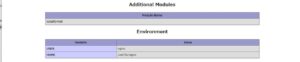
phpinfo.phpファイルに「phpinfo();」を記述してブラウザでアクセスして、kolabformatが読み込まれているか確認する。
設定したkolabformatが「Additional Modules」に表示されたことを確認した。
phpのpearパッケージをインストールする
以下のphpパッケージをpearコマンドでインストールする。
・HTTP/Request2
・Net/URL2
同時に2つのパッケージがインストールできた。
# which pear
/usr/bin/pear
#
# pear install HTTP_Request2
WARNING: channel "pear.php.net" has updated its protocols, use "pear channel-update pear.php.net" to update
downloading HTTP_Request2-2.6.0.tgz ...
Starting to download HTTP_Request2-2.6.0.tgz (127,945 bytes)
.............................done: 127,945 bytes
downloading Net_URL2-2.2.1.tgz ...
Starting to download Net_URL2-2.2.1.tgz (20,010 bytes)
...done: 20,010 bytes
install ok: channel://pear.php.net/Net_URL2-2.2.1
install ok: channel://pear.php.net/HTTP_Request2-2.6.0
#
roundcubemailの動作を確認する。
サーバエラーになりroundcubemailに動作しない
ブラウザでアクセスするとサーバエラーになり動作しない。
nginxのエラーログを確認すると以下のエラーメッセージ有った。
phpを8.3アップグレードしたため、初期定義されていない変数に関してエラーになる。
※本文は一行であるが、理解できるように改行している。
2025/02/01 08:11:02 [error] 157396#157396: *9 FastCGI sent in stderr: "
PHP message: PHP Deprecated:  Creation of dynamic property thunderbird_labels::$name is deprecated in /usr/share/roundcubemail/plugins/thunderbird_labels/thunderbird_labels.php on line 50;
PHP message: PHP Deprecated:  Creation of dynamic property thunderbird_labels::$add_tb_flags is deprecated in /usr/share/roundcubemail/plugins/thunderbird_labels/thunderbird_labels.php on line 52;
PHP message: PHP Deprecated:  Creation of dynamic property thunderbird_labels::$message_tb_labels is deprecated in /usr/share/roundcubemail/plugins/thunderbird_labels/thunderbird_labels.php on line 59;
PHP message: PHP Deprecated:  Creation of dynamic property tasklist::$driver is deprecated in /usr/share/roundcubemail/plugins/tasklist/tasklist.php on line 195;
PHP message: PHP Fatal error:  Uncaught Error: Class "Sabre\VObject\Property\Text" not found in /usr/share/roundcubemail/plugins/libcalendaring/lib/libcalendaring_vcalendar.php:1577
プログラムを修正する。
エラー修正のため以下のソースを修正する。
・thunderbird_labels.php(今回の関連するパッケージではない)
・tasklist.php
# cd /usr/share/roundcubemail/plugins
#
# cd thunderbird_labels
#
# cp thunderbird_labels.php_org thunderbird_labels.php
#
# vi thunderbird_labels.php
#
# diff -c thunderbird_labels.php_org thunderbird_labels.php
*** thunderbird_labels.php_org  2025-02-01 08:19:41.453083991 +0900
--- thunderbird_labels.php      2025-02-01 08:32:00.168201753 +0900
***************
*** 16,21 ****
--- 16,25 ----
        private $_custom_flags_allowed = null;
        const LABEL_STYLES = ['thunderbird', 'bullets', 'badges'];

+       public $name;
+       public $add_tb_flags;
+       public $message_tb_labels;
+
        function init()
        {
                $this->rc = rcmail::get_instance();
#
# cd ../tasklist
#
# cp -p tasklist.php tasklist.php_org
#
# vi tasklist.php
#
# diff -c tasklist.php_org tasklist.php
*** tasklist.php_org    2021-05-09 16:14:59.000000000 +0900
--- tasklist.php        2025-02-01 08:32:26.610595188 +0900
***************
*** 68,73 ****
--- 68,74 ----
      private $message_tasks   = array();
      private $task_titles     = array();

+     public $driver;

      /**
       * Plugin initialization.
#
他に必要な情報が無いかと、他のパッケージのREADMEを確認する
他に必要なパッケージが有るか確認する、
libcalendaringパッケージのREADMEを確認する
# cat libcalendaring/README
Library providing common functions for calendar-based plugins
-------------------------------------------------------------

Provides utility functions for calendar-related modules such as

* alarms display and dismissal
* attachment handling
* iCal parsing and exporting
* iTip invitations handling

iCal parsing and exporting is done with the help of the Sabre VObject
library [1]. It needs to be insalled with Roundcube using composer:

  $ composer require "sabre/vobject" "~4.5.1"

[1]: http://sabre.io/vobject/
#
sabre/vobjectパッケージをインストールする
# cd /usr/share/roundcubemail/
# composer require sabre/vobject ~4.5
Do not run Composer as root/super user! See https://getcomposer.org/root for details
Continue as root/super user [yes]?
Composer could not detect the root package (roundcube/roundcubemail) version, defaulting to '1.0.0'. See https://getcomposer.org/root-version
./composer.json has been updated
Composer could not detect the root package (roundcube/roundcubemail) version, defaulting to '1.0.0'. See https://getcomposer.org/root-version
Running composer update sabre/vobject
Loading composer repositories with package information
Updating dependencies
Lock file operations: 3 installs, 0 updates, 0 removals
  - Locking sabre/uri (3.0.2)
  - Locking sabre/vobject (4.5.6)
  - Locking sabre/xml (4.0.6)
Writing lock file
Installing dependencies from lock file (including require-dev)
Package operations: 3 installs, 0 updates, 0 removals
  - Downloading sabre/uri (3.0.2)
  - Downloading sabre/xml (4.0.6)
  - Downloading sabre/vobject (4.5.6)
  - Installing sabre/uri (3.0.2): Extracting archive
  - Installing sabre/xml (4.0.6): Extracting archive
  - Installing sabre/vobject (4.5.6): Extracting archive
 0/3 [>---------------------------]   0%    Skipped installation of bin bin/vobject for package sabre/vobject: name conflicts with an existing file
    Skipped installation of bin bin/generate_vcards for package sabre/vobject: name conflicts with an existing file
1 package suggestions were added by new dependencies, use `composer suggest` to see details.
Generating autoload files
4 packages you are using are looking for funding.
Use the `composer fund` command to find out more!
No security vulnerability advisories found.
#
インストールしたphpパッケージを自動ロードするように設定する
php.iniファイルを修正するため、phpの再読み込みを行うためphp-fpmの再起動を行う。
# cp /etc/php.ini /etc/php.ini_org
# vi /etc/php.ini
# diff -c php.ini_org php.ini
*** php.ini_org 2024-12-27 20:59:42.927231405 +0900
--- php.ini     2025-02-01 08:59:52.408596490 +0900
***************
*** 918,923 ****
--- 920,927 ----
  ; found in the directory /etc/php.d; these are loaded by default.
  ;;;;

+ include 'vendor/autoload.php';
+
  ;;;;;;;;;;;;;;;;;;;
  ; Module Settings ;
  ;;;;;;;;;;;;;;;;;;;
#
# systemctl restart nginx
#
# systemctl restart php-fpm
#
roundcubemailのカレンダーとタスクリストの動作確認
カレンダーとタスクリストのプラグインの動作を確認する。
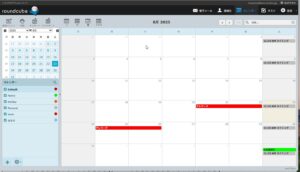
ボタンが有効化となり利用可能となった。
ただし、css変換が正しく行われないためなのか、calendarに「personal」や「work」のカテゴリで色が変わるはずですが、すべて色が赤で登録される。
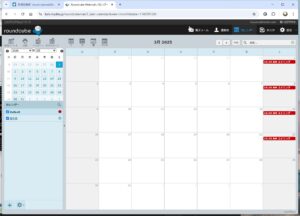
カテゴリの代わりにカレンダー種別で色を変える。
画面左下の「+」をクリックし、カテゴリごとの種別のカレンダーを記述を登録する。
新規イベント登録時に、カレンダー種別登録時に上記手順で登録したカテゴリにに対応するカレンダーを指定して登録する。
まとめ
WEBの情報では記述されていないパッケージをたくさんインストールして動作する様になった。
カテゴリでの色指定は正常に動作していないが、結果的には目的の動作はできていると思われる。